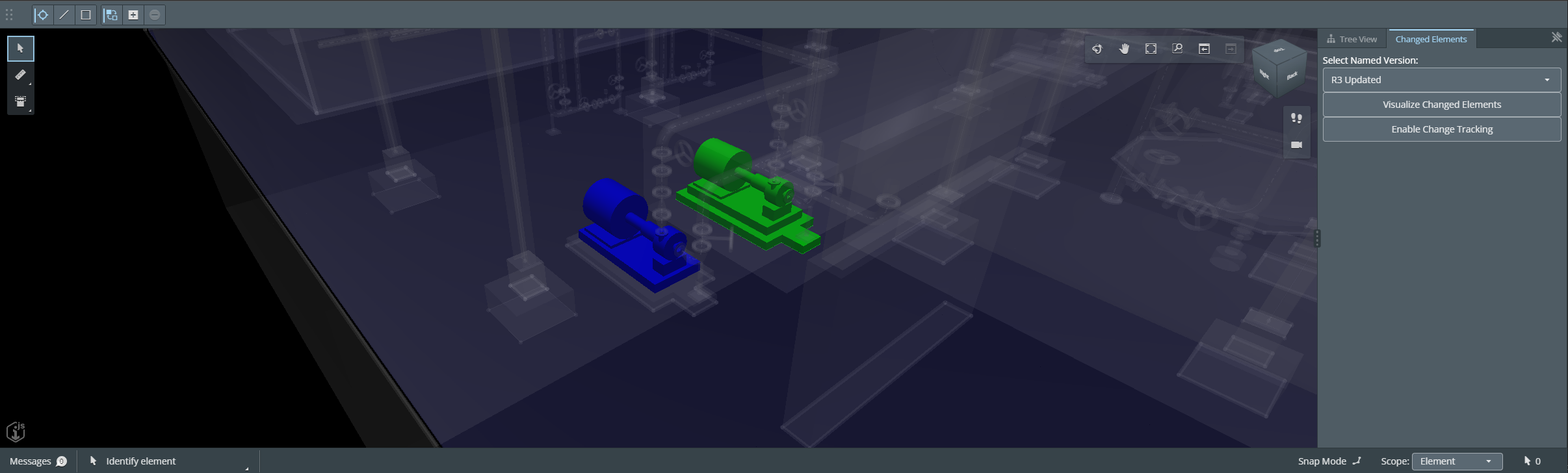
Introduction
The Changed Elements API V3 introduces diff jobs and configurable diffing strategies for comparing an iModel over a range of changesets. In this tutorial, you will use the VersionCompare strategy so the API returns the same ChangedElements data shape that works well with an iTwin.js visualization workflow.
By the end of this tutorial, you will have a small iTwin.js application that creates a diff job, polls for job progress, retrieves the completed result, and colorizes the changed elements in the viewer.
Info
Skill level:
Basic
Duration:
45 minutes
1. Set up your environment
To do this tutorial, it is recommended that you complete Get started with iTwin Platform first. This tutorial expects that you already have a registered application and understand how to configure the sample app's .env file.
1.1 Required materials
This tool provides the JavaScript runtime required to install dependencies, run the viewer application, and build the sample code used in this tutorial.
This is the source control system used by the tutorial repository.
This is the GitHub repository that you will use in this tutorial. Clone the start-v3 branch as your starting point. If you want to compare your work against a completed implementation, use the repository's v3 branch.


1.2 Suggested materials
Chrome is useful for debugging frontend JavaScript and inspecting network requests while you test the sample application.
This is our recommended editor for building iTwin.js applications.
If you want to test the REST API calls directly, you can use Postman or any other HTTP client. You will need a valid authorization token for the requests to succeed.
You can also try the endpoints from the API documentation page. Each operation has a Try it out button.
To learn more about how authentication and authorization work in an iTwin-powered application, see the full authorization documentation.


2. Overview of Changed Elements API V3
Before writing code, it helps to understand how the V3 diff job workflow differs from the V2 comparison job workflow.
2.1 Create Diff Job
This operation queues a new diff job for the specified iModel and changeset range. Unlike V2, V3 expects numeric changeset indices instead of changeset Ids.
In this tutorial, we use the VersionCompare strategy because it returns the same ChangedElements payload shape used by the V2 tutorial. That means the visualization logic can stay focused on elements and opcodes instead of adapting to a new result format.
See Create Diff Job API for more details. To resolve changeset indices from the iModel, use Get iModel Changesets API.
Example HTTP Request for Create Diff Job
POST https://api.bentley.com/changedelements/diff HTTP/1.1
Authorization: Bearer Your_Access_Token
Accept: application/vnd.bentley.itwin-platform.v3+json
Content-Type: application/json

{
  "iTwinId": "myItwinId",
  "iModelId": "myIModelId",
  "startChangesetIndex": 12,
  "endChangesetIndex": 18,
  "diffingPlan": {
    "strategy": "VersionCompare"
  }
}
Example result from Create Diff Job
{
   "job": {
     "jobId": "3fa85f64-5717-4562-b3fc-2c963f66afa6",
     "status": "Queued",
     "iTwinId": "myItwinId",
     "iModelId": "myIModelId",
     "startChangesetIndex": 12,
     "endChangesetIndex": 18,
     "diffingPlan": {
       "strategy": "VersionCompare"
     }
   }
}
2.2 List Diff Jobs
This operation returns the diff jobs that already exist for an iModel. Each entry contains only the job ID and the changeset range, so you still need Get Diff Job to retrieve status, progress, and the result link.
This endpoint is useful in a tutorial sample because V3 generates job IDs on the server. Our client will use GET /diff to find the matching job for the selected changeset range before it calls GET /diff/{jobId} or DELETE /diff/{jobId}.
See List Diff Jobs API for more details.
Example HTTP Request for List Diff Jobs
GET https://api.bentley.com/changedelements/diff?iTwinId=myItwinId&iModelId=myIModelId HTTP/1.1
Authorization: Bearer Your_Access_Token
Accept: application/vnd.bentley.itwin-platform.v3+json
Example result from List Diff Jobs
{
  "jobs": [
    {
      "jobId": "3fa85f64-5717-4562-b3fc-2c963f66afa6",
      "iTwinId": "myItwinId",
      "iModelId": "myIModelId",
      "startChangesetIndex": 12,
      "endChangesetIndex": 18
    }
  ]
}
2.3 Get Diff Job
This operation retrieves the current status of a diff job. When the job is complete, the response includes an href to the result blob. When the job fails, the response includes an error field that explains why.
The result blob returned by href matches the ChangedElements interface when you submit the job with the VersionCompare strategy.
See Get Diff Job API for more details.
Example HTTP Request for Get Diff Job
GET https://api.bentley.com/changedelements/diff/3fa85f64-5717-4562-b3fc-2c963f66afa6?iTwinId=myItwinId&iModelId=myIModelId HTTP/1.1
Authorization: Bearer Your_Access_Token
Accept: application/vnd.bentley.itwin-platform.v3+json
Example result from Get Diff Job
{
  "job": {
    "jobId": "3fa85f64-5717-4562-b3fc-2c963f66afa6",
    "status": "Completed",
    "iTwinId": "myItwinId",
    "iModelId": "myIModelId",
    "startChangesetIndex": 12,
    "endChangesetIndex": 18,
    "diffingPlan": {
      "strategy": "VersionCompare"
    },
    "href": "https://example.blob.core.windows.net/results.json?sv=...",
    "completedAgents": 6,
    "totalAgents": 6
  }
}
2.4 Delete Diff Job
This operation deletes a diff job and its associated result blobs. A successful response returns 204 No Content.
The V3 delete operation is idempotent, but you still need the correct job ID to target the job that matches your selected range.
See Delete Diff Job API for more details.
Example HTTP Request for Delete Diff Job
DELETE https://api.bentley.com/changedelements/diff/3fa85f64-5717-4562-b3fc-2c963f66afa6?iTwinId=myItwinId&iModelId=myIModelId HTTP/1.1
Authorization: Bearer Your_Access_Token
Accept: application/vnd.bentley.itwin-platform.v3+json
3. Putting it to work
We have covered the V3 workflow, so now we can wire it into a simple viewer widget.
As mentioned in Set up your environment, start from the start-v3 branch. Get started with iTwin Platform explains how to populate the .env file used by the sample application.
After cloning the branch and configuring .env, run npm install once so your local dependency tree matches the tested v3 branch before you start editing the sample.
The widget in this tutorial will let the user select a named version, create a diff job, delete a diff job, and visualize the differences between the current iModel version and the selected named version.
3.1 Creating the Changed Elements Client
After cloning the start-v3 branch of the repository, create a new .ts file called ChangedElementsClient.ts. This file will contain the API and data-resolution logic used by the widget.
The biggest V3 change is that diff jobs use changeset indices, while named versions still reference changeset IDs. Because of that, the client needs one more helper than the V2 tutorial: it must resolve the selected named version's changesetId to its numeric changeset index before it can create or locate a diff job.
ChangedElementsClient.ts
import { IModelApp, IModelConnection } from "@itwin/core-frontend";
import {
  Authorization,
  IModelsClient,
  NamedVersion,
  NamedVersionState,
  toArray,
} from "@itwin/imodels-client-management";

interface DiffJobSummary {
  jobId: string;
  iTwinId: string;
  iModelId: string;
  startChangesetIndex: number;
  endChangesetIndex: number;
}

interface DiffJob extends DiffJobSummary {
  status: "Queued" | "Started" | "Completed" | "Failed";
  diffingPlan: {
    strategy: string;
  };
  href?: string;
  error?: string;
  completedAgents?: number;
  totalAgents?: number;
}

interface DiffJobResponse {
  job: DiffJob;
}

interface DiffJobListResponse {
  jobs: DiffJobSummary[];
}

export class ChangedElementsClient {
  private static readonly _baseUrl = "https://api.bentley.com/changedelements/diff";
  private static readonly _changesetIndexCache = new Map<string, Map<string, number>>();

  public static async getAuthorization(): Promise<Authorization> {
    if (!IModelApp.authorizationClient)
      throw new Error("AuthorizationClient is not defined. Most likely IModelApp.startup was not called yet.");

    const token = await IModelApp.authorizationClient.getAccessToken();
    const parts = token.split(" ");
    return parts.length === 2
      ? { scheme: parts[0], token: parts[1] }
      : { scheme: "Bearer", token };
  }

  public static async fetchVisibleNamedVersions(iModelId: string): Promise<NamedVersion[]> {
    const client = new IModelsClient();
    const versionIterator = client.namedVersions.getRepresentationList({
      urlParams: { $top: 10 },
      iModelId,
      authorization: () => ChangedElementsClient.getAuthorization(),
    });

    return (await toArray(versionIterator)).filter(
      (version) => version.state === NamedVersionState.Visible
    );
  }

  private static async getChangesetIndex(iModelId: string, changesetId: string): Promise<number> {
    let indexById = this._changesetIndexCache.get(iModelId);

    if (!indexById) {
      const client = new IModelsClient();
      const changesetIterator = client.changesets.getRepresentationList({
        iModelId,
        authorization: () => ChangedElementsClient.getAuthorization(),
      });

      const changesets = await toArray(changesetIterator);
      indexById = new Map(
        changesets
          .filter((changeset) => changeset.id !== undefined && changeset.index !== undefined)
          .map((changeset) => [changeset.id as string, changeset.index as number])
      );

      this._changesetIndexCache.set(iModelId, indexById);
    }

    const changesetIndex = indexById.get(changesetId);
    if (changesetIndex === undefined)
      throw new Error("Could not resolve changeset index for the selected version.");

    return changesetIndex;
  }

  private static async getDiffRange(iModel: IModelConnection, startChangesetId: string | null) {
    const iModelId = iModel.iModelId;
    const iTwinId = iModel.iTwinId;
    const endChangesetId = iModel.changeset.id;

    if (!iModelId || !iTwinId || !endChangesetId)
      throw new Error("IModel is not properly defined.");

    if (!startChangesetId)
      throw new Error("Start changeset ID is not properly defined.");

    const [startChangesetIndex, endChangesetIndex] = await Promise.all([
      this.getChangesetIndex(iModelId, startChangesetId),
      this.getChangesetIndex(iModelId, endChangesetId),
    ]);

    if (endChangesetIndex <= startChangesetIndex)
      throw new Error("Select a named version that is older than the current iModel version.");

    return {
      iModelId,
      iTwinId,
      startChangesetIndex,
      endChangesetIndex,
    };
  }

  private static async readError(response: Response): Promise<string> {
    const body = await response.json().catch(() => undefined);
    return body?.error?.message?.toString() ?? response.statusText;
  }
}
3.2 Creating the Changed Elements Widget
Create another new file called ChangedElementsWidget.tsx. This file will contain the UI for the custom widget.
As in the V2 tutorial, we will use fetchVisibleNamedVersions inside a useEffect to populate a dropdown of named versions. The UI is almost the same, but the labels now reflect V3 terminology and refer to diff jobs instead of comparison jobs.
The tested v3 branch also resets the selection to the first returned version after loading and disables the action buttons until a visible named version is available. That keeps the widget stable when the list is empty or still loading.
Create a matching ChangedElementsWidget.scss file to add the simple layout and text styling shown in the snippet.
ChangedElementsWidget.tsx
import { IModelConnection } from "@itwin/core-frontend";
import { NamedVersion } from "@itwin/imodels-client-management";
import { Button, LabeledSelect, Text } from "@itwin/itwinui-react";
import { useEffect, useState } from "react";

import { ChangedElementsClient } from './ChangedElementsClient';
import './ChangedElementsWidget.scss';

export interface ChangedElementsWidgetProps {
  iModel: IModelConnection | undefined;
}

export function ChangedElementsWidget(props: ChangedElementsWidgetProps) {
  const [namedVersions, setNamedVersions] = useState<NamedVersion[]>([]);
  const [selectedVersionIndex, setSelectedVersionIndex] = useState<number>(0);
  const selectedVersion = namedVersions[selectedVersionIndex];

  const namedVersionOptions = namedVersions.map((version, index) => ({
    value: index,
    label: version.displayName?.toString() ?? version.name?.toString() ?? `Version ${index + 1}`,
  }));

  useEffect(() => {
    const fetchVersions = async () => {
      if (!props.iModel?.iModelId)
        return;

      const versionsArray = await ChangedElementsClient.fetchVisibleNamedVersions(props.iModel.iModelId);
      setNamedVersions(versionsArray);
      setSelectedVersionIndex(0);
    };

    void fetchVersions();
  }, [props.iModel]);

  return (
    <div className="widget-container">
      <Text>Changed Elements V3 Widget</Text>
      <LabeledSelect
        label="Select Version"
        displayStyle="inline"
        options={namedVersionOptions}
        value={selectedVersionIndex}
        onChange={(value) => setSelectedVersionIndex(Number(value ?? 0))}
      />
      <Text className="widget-progress-text">
        Diff Job Progress: {selectedVersion ? "NA" : "No versions available"}
      </Text>

      <Button onClick={() => {}} disabled={!selectedVersion}>Create Diff Job</Button>
      <Button onClick={() => {}} disabled={!selectedVersion}>Visualize Diff</Button>
      <Button onClick={() => {}} disabled={!selectedVersion}>Delete Diff Job</Button>
    </div>
  );
}
ChangedElementsWidget.scss
.widget-container {
  margin: 8px;
  display: flex;
  flex-direction: column;
  gap: 10px;
}

.widget-label {
  color: white;
  font-size: 14px;
}

.widget-progress-text {
  font-size: 14px;
  font-weight: bold;
}
3.3 Adding the widget to the application
Import ChangedElementsWidget into App.tsx, create a UiItemsProvider named changedElementsWidgetProvider, and return the widget from that provider.
Then add the provider to the uiProviders array of the Viewer component. At that point, the widget should appear in the right-side panel of the application.
Check App.tsx if you want to verify that the widget was added in the correct place.
Create a UI Items Provider
const changedElementsWidgetProvider: UiItemsProvider = {
  id: "example:Provider",
  getWidgets: () => [
    {
      id: "example:Widget",
      content: <ChangedElementsWidget iModel={UiFramework.getIModelConnection()} />,
      layouts: {
        standard: {
          location: StagePanelLocation.Right,
          section: StagePanelSection.Start,
        },
      },
    },
  ],
};
Add to Viewer in App.tsx
uiProviders={[
  changedElementsWidgetProvider,
  new ViewerNavigationToolsProvider(),
  ...restOfCode,
]}
3.4 Writing a client for the API
Now we can add the V3-specific client methods.
There are two important differences from the V2 implementation:
- V3 creates server-generated job IDs, so you cannot derive the job ID locally from the selected range.
- Because of that, the sample uses
GET /diffto find the matching diff job before callingGET /diff/{jobId}orDELETE /diff/{jobId}.
Here is what the ChangedElementsClient.ts file should look like when you are done with this section.
Create, List, Get, and Delete API calls in ChangedElementsClient.ts
public static async listDiffJobs(iModel: IModelConnection): Promise<DiffJobSummary[]> {
  const iModelId = iModel.iModelId;
  const iTwinId = iModel.iTwinId;

  if (!iModelId || !iTwinId)
    throw new Error("IModel is not properly defined.");

  const authorization = await this.getAuthorization();
  const response = await fetch(
    this._baseUrl + "?iTwinId=" + iTwinId + "&iModelId=" + iModelId,
    {
      method: "GET",
      headers: {
        Authorization: authorization.scheme + " " + authorization.token,
        Accept: "application/vnd.bentley.itwin-platform.v3+json",
      },
    }
  );

  if (!response.ok)
    throw new Error(await this.readError(response));

  const data = (await response.json()) as DiffJobListResponse;
  return data.jobs ?? [];
}

private static async findDiffJob(
  iModel: IModelConnection,
  startChangesetId: string | null
): Promise<DiffJobSummary | null> {
  const range = await this.getDiffRange(iModel, startChangesetId);
  const jobs = await this.listDiffJobs(iModel);

  return (
    jobs.find(
      (job) =>
        job.startChangesetIndex === range.startChangesetIndex &&
        job.endChangesetIndex === range.endChangesetIndex
    ) ?? null
  );
}

public static async createDiffJob(iModel: IModelConnection, startChangesetId: string | null) {
  const { iTwinId, iModelId, startChangesetIndex, endChangesetIndex } = await this.getDiffRange(
    iModel,
    startChangesetId
  );

  const authorization = await this.getAuthorization();
  const response = await fetch(this._baseUrl, {
    method: "POST",
    headers: {
      Authorization: authorization.scheme + " " + authorization.token,
      "Content-Type": "application/json",
      Accept: "application/vnd.bentley.itwin-platform.v3+json",
    },
    body: JSON.stringify({
      iTwinId,
      iModelId,
      startChangesetIndex,
      endChangesetIndex,
      diffingPlan: {
        strategy: "VersionCompare",
      },
    }),
  });

  if (response.status === 409) {
    const existingJob = await this.getDiffJob(iModel, startChangesetId);
    if (existingJob)
      return existingJob;
  }

  if (!response.ok)
    throw new Error(await this.readError(response));

  const data = (await response.json()) as DiffJobResponse;
  return data.job;
}

public static async getDiffJob(
  iModel: IModelConnection,
  startChangesetId: string | null
): Promise<DiffJob | null> {
  const matchingJob = await this.findDiffJob(iModel, startChangesetId);
  if (!matchingJob)
    return null;

  const authorization = await this.getAuthorization();
  const response = await fetch(
    this._baseUrl +
      "/" +
      matchingJob.jobId +
      "?iTwinId=" +
      matchingJob.iTwinId +
      "&iModelId=" +
      matchingJob.iModelId,
    {
      method: "GET",
      headers: {
        Authorization: authorization.scheme + " " + authorization.token,
        Accept: "application/vnd.bentley.itwin-platform.v3+json",
      },
    }
  );

  if (response.status === 404)
    return null;

  if (!response.ok)
    throw new Error(await this.readError(response));

  const data = (await response.json()) as DiffJobResponse;
  return data.job;
}

public static async deleteDiffJob(iModel: IModelConnection, startChangesetId: string | null): Promise<boolean> {
  const matchingJob = await this.findDiffJob(iModel, startChangesetId);
  if (!matchingJob)
    return false;

  const authorization = await this.getAuthorization();
  const response = await fetch(
    this._baseUrl +
      "/" +
      matchingJob.jobId +
      "?iTwinId=" +
      matchingJob.iTwinId +
      "&iModelId=" +
      matchingJob.iModelId,
    {
      method: "DELETE",
      headers: {
        Authorization: authorization.scheme + " " + authorization.token,
        Accept: "application/vnd.bentley.itwin-platform.v3+json",
      },
    }
  );

  if (!response.ok)
    throw new Error(await this.readError(response));

  return true;
}
3.4.1 Getting Changed Elements from Href
When a diff job is complete, V3 returns a presigned result URL in the href field. That URL contains the actual diff payload.
Because this tutorial uses the VersionCompare strategy, the JSON at that href contains a changedElements object that can be cast to the ChangedElements interface.
Get Changed Elements from Href
import { ChangedElements } from "@itwin/core-common";

public static async getChangedElementsFromHref(href: string): Promise<ChangedElements | undefined> {
  const response = await fetch(href, {
    method: "GET",
  });

  if (!response.ok)
    throw new Error(response.statusText);

  const data = await response.json();
  return data?.changedElements as ChangedElements;
}
3.5 Adding the API operations to the widget
Now implement the widget button handlers so they call the new V3 client methods.
Each handler is responsible for calling the client, handling the most important job states, and displaying a toast message if something goes wrong. Notice that handleVisualizeDiff checks status and href before it tries to fetch the result blob.
To match the tested v3 branch, use the selectedVersion helper instead of repeating namedVersions[selectedVersionIndex], and import toaster from @itwin/itwinui-react for the status messages.
The visualization step is still missing at this point. We will add that in the next section.
Here is what the ChangedElementsWidget.tsx file should look like when you are done with this section.
Handle button onClick events in ChangedElementsWidget.tsx
const handleCreateDiffJob = async () => {
  if (!props.iModel || !selectedVersion)
    return;

  try {
    await ChangedElementsClient.createDiffJob(
      props.iModel,
      selectedVersion.changesetId
    );

    setDiffJobActive((value) => !value);
    toaster.positive(<Text>Diff job created successfully.</Text>);
  } catch (error) {
    toaster.negative(
      <>
        <Text>Failed to create diff job</Text>
        <Text variant="small">{(error as Error)?.message ?? "Error creating diff job"}</Text>
      </>
    );
  }
};

const handleVisualizeDiff = async () => {
  if (!props.iModel || !selectedVersion)
    return;

  try {
    const diffJob = await ChangedElementsClient.getDiffJob(
      props.iModel,
      selectedVersion.changesetId
    );

    if (!diffJob) {
      toaster.negative(<Text>Diff job not found</Text>);
      return;
    }

    if (diffJob.status === "Failed") {
      toaster.negative(
        <>
          <Text>Diff job failed</Text>
          <Text variant="small">{diffJob.error ?? "The diff job failed."}</Text>
        </>
      );
      return;
    }

    if (!diffJob.href) {
      toaster.negative(<Text>Diff job not ready</Text>);
      return;
    }

    const changedElements = await ChangedElementsClient.getChangedElementsFromHref(diffJob.href);

    // add VisualizeChange.visualizeDiff in the next section
  } catch (error) {
    toaster.negative(
      <>
        <Text>Failed to visualize diff</Text>
        <Text variant="small">{(error as Error)?.message ?? "Error getting diff job"}</Text>
      </>
    );
  }
};

const handleDeleteDiffJob = async () => {
  if (!props.iModel || !selectedVersion)
    return;

  try {
    const deleted = await ChangedElementsClient.deleteDiffJob(
      props.iModel,
      selectedVersion.changesetId
    );

    if (!deleted) {
      toaster.informational(<Text>No matching diff job was found.</Text>);
      return;
    }

    setDiffJobActive((value) => !value);
    toaster.positive(<Text>Diff job deleted successfully.</Text>);
  } catch (error) {
    toaster.negative(
      <>
        <Text>Error deleting diff job</Text>
        <Text variant="small">{(error as Error)?.message ?? "Error deleting diff job"}</Text>
      </>
    );
  }
};
Button component
<Button onClick={handleCreateDiffJob} disabled={!selectedVersion}>Create Diff Job</Button>
<Button onClick={handleVisualizeDiff} disabled={!selectedVersion}>Visualize Diff</Button>
<Button onClick={handleDeleteDiffJob} disabled={!selectedVersion}>Delete Diff Job</Button>
3.6 Change visualization
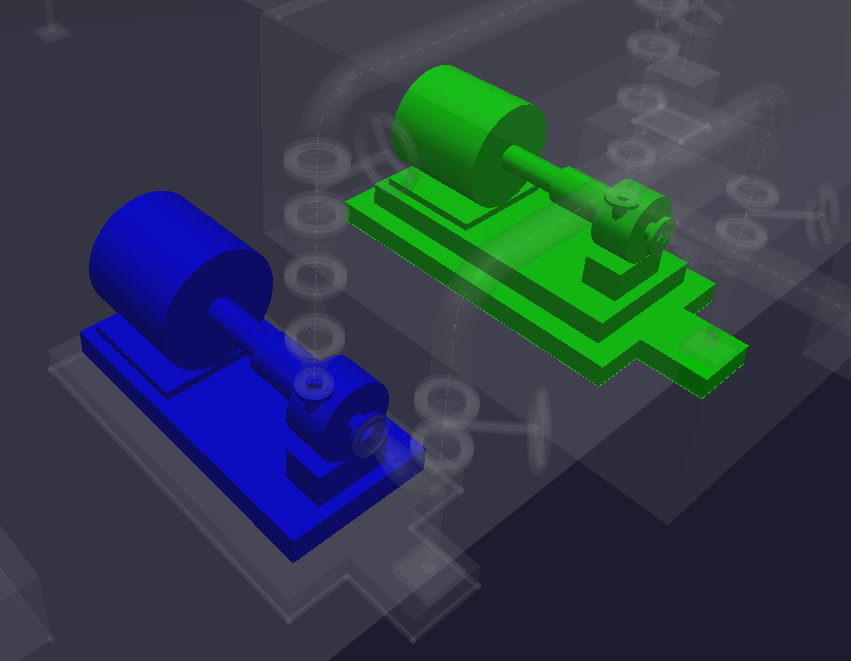
The visualization code stays almost identical because the VersionCompare strategy returns the same ChangedElements shape that the V2 tutorial used.
Create a feature override provider that highlights inserted elements in green and updated elements in blue. Then add a helper that reads the opcodes array and feeds the matching element IDs into that provider.
Here is what the VisualizeChange.tsx file should look like when you are done with this section.
VisualizeChange.tsx
import { DbOpcode, Id64Array } from "@itwin/core-bentley";
import { ChangedElements, ColorDef, FeatureAppearance } from "@itwin/core-common";
import { FeatureOverrideProvider, FeatureSymbology, IModelApp, Viewport } from "@itwin/core-frontend";
import { Text, toaster } from "@itwin/itwinui-react";

class DiffJobProvider implements FeatureOverrideProvider {
  private _insertOp: Id64Array = [];
  private _updateOp: Id64Array = [];
  private static _provider: DiffJobProvider | undefined;

  public static setDiff(viewport: Viewport, insertOp: Id64Array, updateOp: Id64Array): DiffJobProvider {
    DiffJobProvider.dropDiff(viewport);
    DiffJobProvider._provider = new DiffJobProvider(insertOp, updateOp);
    viewport.addFeatureOverrideProvider(DiffJobProvider._provider);
    return DiffJobProvider._provider;
  }

  public static dropDiff(viewport: Viewport) {
    if (DiffJobProvider._provider !== undefined)
      viewport.dropFeatureOverrideProvider(DiffJobProvider._provider);

    DiffJobProvider._provider = undefined;
  }

  private constructor(insertOp: Id64Array, updateOp: Id64Array) {
    this._insertOp = insertOp;
    this._updateOp = updateOp;
  }

  public addFeatureOverrides(overrides: FeatureSymbology.Overrides, _viewport: Viewport) {
    const defaultAppearance = FeatureAppearance.fromJSON({
      rgb: { r: 200, g: 200, b: 200 },
      transparency: 0.9,
      nonLocatable: true,
    });

    overrides.setDefaultOverrides(defaultAppearance);

    const insertFeature = FeatureAppearance.fromRgb(ColorDef.green);
    const updateFeature = FeatureAppearance.fromRgb(ColorDef.blue);

    this._insertOp.forEach((id) => overrides.override({ elementId: id, appearance: insertFeature }));
    this._updateOp.forEach((id) => overrides.override({ elementId: id, appearance: updateFeature }));
  }
}

export class VisualizeChange {
  public static async visualizeDiff(changedElements: ChangedElements) {
    const vp = IModelApp.viewManager.selectedView;
    if (vp === undefined)
      return;

    const elementIds = changedElements?.elements;
    const opcodes = changedElements?.opcodes;
    const insertOp: Id64Array = [];
    const updateOp: Id64Array = [];
    let msgBrief = "";
    let msgDetail = "";

    if (
      elementIds === undefined ||
      elementIds.length <= 0 ||
      opcodes === undefined ||
      opcodes.length <= 0 ||
      elementIds.length !== opcodes.length
    ) {
      msgBrief = "No elements changed";
      msgDetail = "There were 0 elements changed between the selected versions.";
    } else {
      msgBrief = `${elementIds.length} elements changed`;
      msgDetail = `There were ${elementIds.length} elements changed between the selected versions.`;

      for (let index = 0; index < elementIds.length; index += 1) {
        switch (opcodes[index]) {
          case DbOpcode.Insert:
            insertOp.push(elementIds[index]);
            break;
          case DbOpcode.Update:
            updateOp.push(elementIds[index]);
            break;
        }
      }
    }

    toaster.informational(
      <>
        <Text>{msgBrief}</Text>
        <Text variant="small">{msgDetail}</Text>
      </>
    );

    DiffJobProvider.setDiff(vp, insertOp, updateOp);
    return { elementIds, opcodes };
  }
}
3.6.1 Adding visualization to the button handler
After you retrieve the href and download the changedElements payload, import VisualizeChange from ./VisualizeChange and call VisualizeChange.visualizeDiff in handleVisualizeDiff.
At that point, clicking the visualize button should color inserted elements green and updated elements blue.
handleVisualizeDiff method in ChangedElementsWidget.tsx
const changedElements = await ChangedElementsClient.getChangedElementsFromHref(diffJob.href);
if (changedElements) {
  await VisualizeChange.visualizeDiff(changedElements);
}
3.7 Getting status updates for the diff job
The tested v3 branch includes a small progress display while the diff job is still queued or running. In V3, the GET /diff/{jobId} response exposes completedAgents and totalAgents, so we can convert that into a simple percentage when those fields are present.
Back in ChangedElementsWidget.tsx, create an interval that calls fetchProgress every few seconds. Use the selectedVersion helper and the diffJobActive state in the dependency list so the UI refreshes when the user creates or deletes a job.
Remember to render the progress text in the widget. Once that is in place, the widget will show the current diff job status while the user waits for the result.
Fetch progress in ChangedElementsClient.ts
public static async fetchProgress(iModel: IModelConnection, startChangesetId: string | null): Promise<string> {
  const diffJob = await ChangedElementsClient.getDiffJob(iModel, startChangesetId);

  if (diffJob === null)
    return "Job not found";

  if (diffJob.status === "Failed")
    return "Failed";

  if (diffJob.status === "Completed")
    return "100%";

  return typeof diffJob.completedAgents === "number" &&
    typeof diffJob.totalAgents === "number" &&
    diffJob.totalAgents > 0
      ? ((diffJob.completedAgents / diffJob.totalAgents) * 100).toFixed(0) + "%"
      : diffJob.status;
}
Use fetchProgress with an interval in ChangedElementsWidget.tsx
const [diffJobActive, setDiffJobActive] = useState<boolean>(false);
const [progress, setProgress] = useState<string>("0%");

useEffect(() => {
  let interval: ReturnType<typeof setInterval> | undefined;

  const fetchProgress = async () => {
    if (!props.iModel || !selectedVersion)
      return;

    try {
      const progressPercentage = await ChangedElementsClient.fetchProgress(
        props.iModel,
        selectedVersion.changesetId
      );

      setProgress(progressPercentage);
    } catch (error) {
      toaster.negative(
        <>
          <Text>Failed to fetch diff job progress</Text>
          <Text variant="small">{(error as Error)?.message ?? "Error fetching progress"}</Text>
        </>
      );
    }
  };

  void fetchProgress();
  interval = setInterval(() => {
    void fetchProgress();
  }, 3000);

  return () => {
    if (interval)
      clearInterval(interval);
  };
}, [props.iModel, selectedVersion, diffJobActive]);
Progress text in ChangedElementsWidget.tsx
<Text className="widget-progress-text">
  Diff Job Progress: {selectedVersion ? progress : "No versions available"}
</Text>

<Button onClick={handleCreateDiffJob} disabled={!selectedVersion}>Create Diff Job</Button>
4. Making sense of Changed Elements data
Because this tutorial uses the VersionCompare strategy, the result blob still contains the ChangedElements object used by the V2 API. Each array in that object has the same length, and that shared length is the number of changed elements returned by the diff job.
4.1 Changed Elements JSON
ChangedElements is defined in the iTwin.js common types and contains several parallel arrays.
elements
Contains the element IDs of the changed elements.
classIds
Contains the ECClass IDs of the changed elements.
opcodes
Contains the operation codes that indicate whether the element was inserted, updated, or deleted. See DbOpcode.
type
Contains the type of change that occurred to the element. This value is a bitflag that can represent property, geometry, placement, indirect, and hidden-property changes.
modelIds
Contains the model IDs of the changed elements.
properties
Contains property accessor names for changed properties on an element.
oldChecksums
Contains the checksum of each property's previous value.
newChecksums
Contains the checksum of each property's new value.
parentIds
Contains the parent element ID. If the element has no parent, this value is "0".
parentClassIds
Contains the ECClass ID of the parent element. If the element has no parent, this value is "0".
5. Trying the Basic strategy
If you want to experiment with a smaller and faster V3 result format, you can switch the sample from VersionCompare to Basic.
The main tradeoff is that Basic no longer returns the V2-style changedElements object. Instead, it returns a compact array of changed items with an element Id (in Big Integer format), class full name, and string operation. That makes it a good fit for visualization-focused applications, but it means you need to update the sample code that currently expects changedElements.elements and changedElements.opcodes.
5.1 What to change in the sample app
To try the Basic strategy yourself, update these parts of the sample:
- In
createDiffJob, changediffingPlan.strategyfromVersionComparetoBasic. - Replace
getChangedElementsFromHrefwith a helper that reads the returned array instead ofdata.changedElements. - Update the visualization step so it groups items by the
operationstring valuesInserted,Updated, andDeletedinstead of reading numericDbOpcodevalues. - Keep using the same feature override provider if you only need inserted and updated elements highlighted in the viewer.
- Update the feature override provider to transform the Big Integer format ids to hex ids
Deleted elements still need special handling because they no longer exist in the current view. For that reason, the simplest adaptation is usually to keep the current inserted and updated highlighting behavior and ignore deleted items in the visualization layer.
If your goal is only to colorize change in the viewer, Basic is the easiest V3 strategy to optimize for performance. If you still need detailed change metadata such as properties, type, or checksum fields, stay with VersionCompare.
Example Basic strategy result
[
  {
    "id":"30786325577784",
    "classFullName":"Construction:ConstructionItem",
    "operation":"Inserted"
  },
  {
    "id":"30786325577784",
    "classFullName":"Construction:ConstructionItemConstructsGeometricElement3d",
    "operation":"Updated"
  },
  {
    "id":"30786325577785",
    "classFullName":"Construction:ConstructionItem",
    "operation":"Deleted"
  }
]
Example helper for the Basic result
interface BasicChangedElement {
  id: string;
  classFullName: string;
  operation: "Inserted" | "Updated" | "Deleted";
}

public static async getBasicChangedElementsFromHref(
  href: string
): Promise<BasicChangedElement[]> {
  const response = await fetch(href, { method: "GET" });
  if (!response.ok)
    throw new Error(response.statusText);

  return (await response.json()) as BasicChangedElement[];
}

public static async visualizeBasicDiff(changes: BasicChangedElement[]) {
  const insertOp = changes
    .filter((change) => change.operation === "Inserted")
    .map((change) => change.ECInstanceId);

  const updateOp = changes
    .filter((change) => change.operation === "Updated")
    .map((change) => change.ECInstanceId);

  const vp = IModelApp.viewManager.selectedView;
  if (vp)
    DiffJobProvider.setDiff(vp, insertOp, updateOp);
}
Conclusion
You now have a tutorial application that uses Changed Elements API V3 diff jobs to visualize change in an iModel. Along the way, you resolved named versions to changeset indices, created and tracked diff jobs, fetched the result blob from the completed job, and reused the ChangedElements payload to colorize the viewer.
This same workflow can be extended to reporting, auditing, review tooling, or other interfaces that need to understand how an iModel changed over time.
More resources that you may like
Was this page helpful?