Migrating to Forms V2
Overview
The Issues API and version 1 of the Forms API are both deprecated and will be discontinued on Oct 7, 2027. Clients using either of these APIs should migrate to using Version 2 of the Forms API, which provides access to both Forms and Issues data. Any new endpoints/features developed from this point forward will only be added to the Forms Version 2 API.
A few breaking changes will likely require modification to your code. Please see the following sections for more details:
- Unified Form and Issue Data: The API now supports both forms and issues and will retrieve both by default unless you specify a
disciplinequery string parameter. - URL Path Conventions: URLs now use hyphen-case instead of camelCase for constant path segments.
- WYSIWYG Property Names: Read and write form data property values using the property name you entered while designing the form rather than a hidden, internal name that may be different.
Unified Form and Issue Data
The Forms V1 API and the Issues API are equivalent in implementation and functionality, except that Issues can only read and modify data under the Issue discipline while Forms V1 can only read and modify form data from non-Issue disciplines.
The Forms V2 API unifies these two APIs--it can work with both forms and issues. When making a request that only retrieves or affects a single object by its ID, such as Get form data details, the API will retrieve that object no matter which discipline it's under.
When querying for multiple objects, such as through Get iTwin form data or Get iTwin form definitions, by default the API will return all objects of that type, regardless of which discipline they belong to. However, if you provide a discipline parameter in the query string, it will only return objects belonging to that discipline. Check the documentation for an operation to see whether it supports the discipline parameter.
Note that "Inspection" is also a supported discipline name. Inspection items are retrieved by the Forms V1 API as it is a non-Issue discipline, but for the Forms V2 API, you must either specify discipline=Inspection exactly or omit the discipline filter to retrieve them.
Examples
Old (Issues)--Get all issues (and only issues) in iTwin:
GET https://api.bentley.com/forms/?iTwinId=00000000-aaaa-bbbb-cccc-ffffffffffff
New (Forms V2)--Get all issues (and only issues) in iTwin:
GET https://api.bentley.com/forms/?iTwinId=00000000-aaaa-bbbb-cccc-ffffffffffff?discipline=Issue
New (Forms V2)--Get all regular forms (not issues) in iTwin:
Note: This is the most similar to the functionality of the Forms V1 API, except that this call omits inspections.
GET https://api.bentley.com/forms/?iTwinId=00000000-aaaa-bbbb-cccc-ffffffffffff?discipline=General Purpose
New (Forms V2)--Get all form data regardless of discipline (gets forms, issues, inspections, etc.):
GET https://api.bentley.com/forms/?iTwinId=00000000-aaaa-bbbb-cccc-ffffffffffff
Endpoints supporting discipline parameter
URL Path Conventions
To match the standards of Bentley REST APIs, all multi-word constant URL path segments have been changed from camelCase to hyphen-case. This only affects constant URL segments that serve to determine which operation you are calling. It does not change the names or accepted values of URL path parameters or query string parameters.
Example call to "Get iTwin form definitions"
Old (Issues/Forms V1):
GET https://api.bentley.com/forms/formDefinitions?iTwinId=00000000-aaaa-bbbb-cccc-ffffffffffff&status=Approved
New (Forms V2):
GET https://api.bentley.com/forms/form-definitions?iTwinId=00000000-aaaa-bbbb-cccc-ffffffffffff&status=Approved
Note that formDefinitions (a constant path segment) changed to form-definitions, while iTwinId (a query string parameter) did not change.
Endpoints Affected
- Get audit trail for form data
- Export forms to Storage
- Delete form definition
- Get form definition by ID
- Get iTwin form definitions
- Get list group
- Get static images
- Import form definition from another iTwin
- Update form definition metadata
- Upload list group file
WYSIWYG Property Names
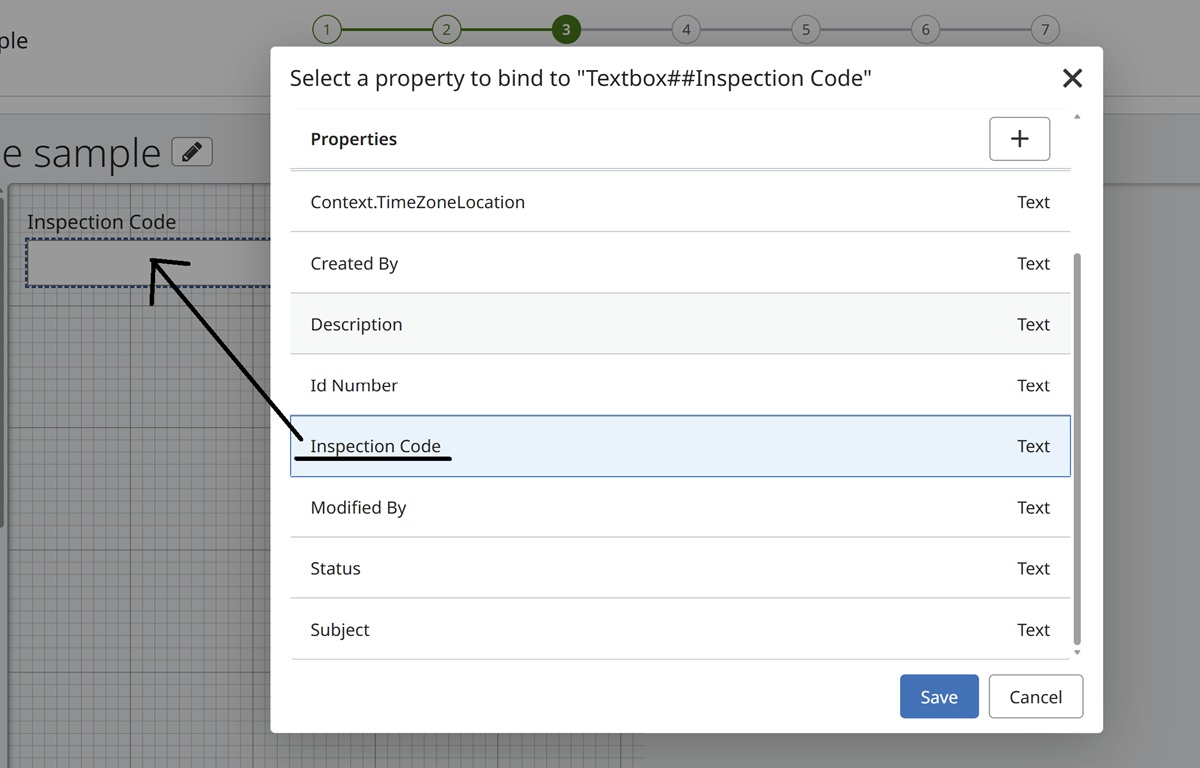
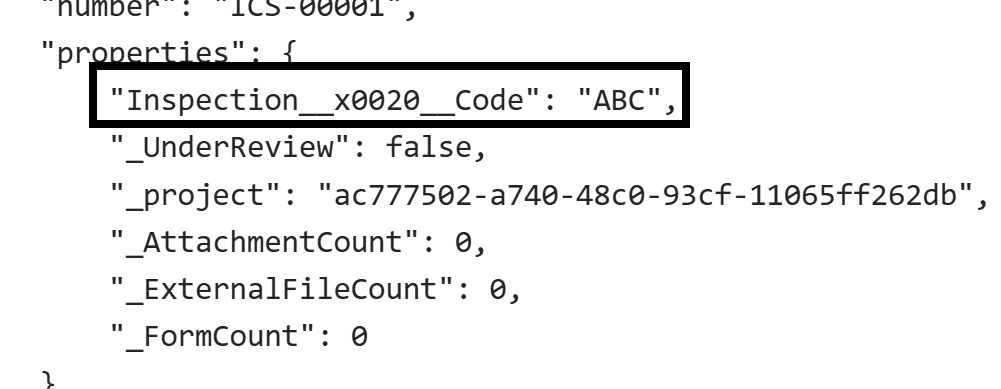
When designing a form definition and creating a custom property for a control, such as binding a new property you named Inspection Code to a text box, sometimes the actual property name (the "internal name") we use to store that data would differ from the name you entered (the "display name"). This was most likely to happen when the display name included spaces; e.g., Inspection Code could become Inspection__x0020__Code.
This could be confusing, as the property name would appear as Inspection Code in the form designer, in the dashboard within BIC, in the audit trail when viewing forms in Bentley applications, and so forth. However, the Forms V1 and Issues APIs would require you to use Inspection__x0020__Code to access the value of the property.
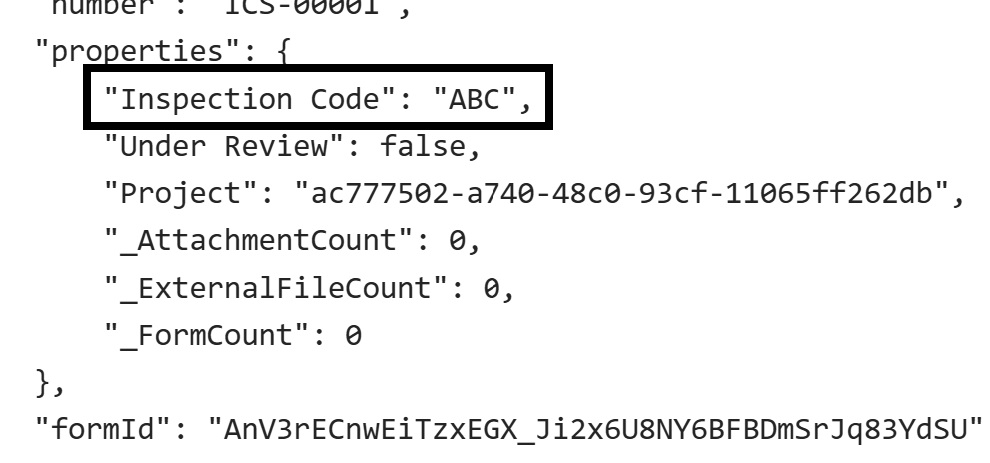
To alleviate this confusion, Version 2 of the Forms API uses the display name of the property as its canonical name for all intents and purposes. For example, you can include
"properties": {
  "Inspection Code": "ABC"
}
within the body of an Update form data request and it will update the Inspection Code property successfully. Likewise, that property will be named Inspection Code in responses containing data from that form definition.
Note that this change only applies to custom (user-created) properties that appear within the properties object of a form data instance. The standard, top-level properties available on all form data instances, like subject, description, and dueDate, are unaffected by this change.
Example
After using the Bentley form designer to create a property called Inspection Code and bind it to a control:
Returned form data could include the following:
Old (Forms V1):
New (Forms V2):
Was this page helpful?