Scenes API Overview
Introduction
The Scenes API lets you create and quickly access predefined digital twin views. With this API, you can define, organize, share, and retrieve scenes of an iTwin, all seamlessly curated from various associated data repositories.
Scenes can be:
- Private: Accessible only to the scene creator.
- Shared within an iTwin ecosystem: Available to iTwin members with the appropriate permissions.
- Publicly shared: Published as view-only experiences that can be accessed without requiring a Bentley account.
Key Features
- Selectively hide or show iTwin repositories and their geometric content while also controlling how that content is presented.
- Store display information, such as camera positions and angles, layer ordering (which is especially useful for managing the display order of 2D data layers), cutout definitions for any 3D tiles-based data layer. Refer to the scenes-client for the complete list of supported functionality.
- Curate individual iTwin scenes or create scenes that involve multiple associated iTwins.
- Share curated scenes with external stakeholders via secure public sharing, enabling view-only access to approved scene content without requiring a Bentley account.
Workflow
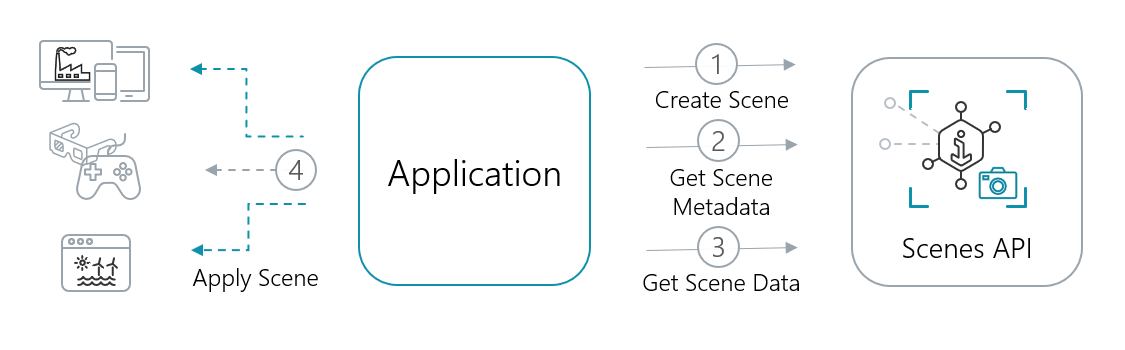
To curate the required scene, follow these steps:
- Create Scene: Use the Create scene endpoint
scenes/?iTwinId={iTwinId}to establish a scene associated with the specified iTwin. You can include up to 100 initial objects during creation or utilize the Create scene objects endpointscenes/{sceneId}/objects?iTwinId={iTwinId}to add objects incrementally. - Get Scene Metadata: Use the Get scene endpoint
scenes/{sceneId}?iTwinId={iTwinId}to retrieve scene metadata and relevant links. - Get Scene Data: Use the Get scene objects endpoint
scenes/{sceneId}/objects?iTwinId={iTwinId}[&orderBy]to retrieve paginated scene objects.
Use Cases
Effective visualization is crucial for making complex data understandable. In digital twins, it connects fragmented datasets into coherent narratives. Enhance your applications by integrating all necessary data into a cohesive visualization experience.
Multi-dimensional data management: Allow the audience to explore and understand complex iTwin(s) data seamlessly. For example, curate a scene to visualize combined reality data, parts of one iModel, together with specific categories enabled from a different iModel, alongside 4D schedules and a map layer for design or condition comparisons. Or create data groups by theme, such as environmental data groups or cost categories, regardless of data type.
Discipline-specific isolation: Tailor visualizations for targeted audiences by highlighting the most relevant data for their roles. Whether it's providing electricians with crucial wiring details or giving commercial managers easy access to floor plans, create focused scenes that enhance understanding without overwhelming distractions.
Interactive design presentations: Utilize scene capabilities to create engaging visual narratives. For example, visualize curated scenes sequentially to guide the audience through a journey.
Public Engagement: Share curated project views with external audiences through a predefined experience, without requiring a Bentley account or project membership. Ideal for public consultations, stakeholder reviews, bids and tenders, and customer presentations.
Permissions
User permissions control access to scenes. The main permissions are:
SCENES_READ: View scenes in read-only mode within an authorized iTwin.SCENES_WRITE: Create, modify, and delete your own scenes.SCENES_MANAGE: View, modify, and delete any scene with visibility: iTwin, regardless of ownership. Intended for administrators who need to manage organizational content, including scenes owned by other users or users who are no longer available.SCENES_SHARE: Publish or revoke public access to scenes. Public sharing does not grant edit rights. To curate or select scenes, users still needSCENES_WRITEorSCENES_MANAGE.
Scene access also depends on its visibility:
- Private and iTwin scenes: Users can access only the data for which they have permissions. Applying a scene does not provide access to the underlying iTwin or its repositories.
- Public scenes: The publisher makes the scene and its content available to anyone. Public viewers do not need explicit access to the underlying iTwin or repositories. Only publish content intended for public consumption.
Illustrative scenario - iTwin visibility
Consider a scene curated for iTwin A, structured as follows:
- Layer A: References iModel A from iTwin A
- Layer B: References iModel B from iTwin B
- Layer C: References Reality Data A from iTwin A
Assuming the following permissions for users accessing the scene:
- User X is a team member in both iTwin A and B, holding a role with
SCENES_READandimodels_readpermissions. - User Y is a team member only in iTwin A, with a role that includes
SCENES_READbut lacksimodels_readpermissions for iModel A. - User Z does not have access to either iTwin A or iTwin B.
Expected access outcomes:
- User X will have read-only access to the scene and all associated data.
- User Y will have read-only access to the scene, but the response will exclude the iModel A repository due to insufficient
imodels_readpermissions. - User Z will encounter a 404 error, reflecting the lack of access to either iTwin A or iTwin B.
Illustrative scenario - Public scene
Consider a scene curated for iTwin P. Assuming the following permissions for users accessing the scene:
- User Z does not have access to iTwin P.
- User W does not have access to iTwin P but accesses the scene through a public share link.
Expected access outcomes:
- User Z will encounter a 404 error, reflecting the lack of access to iTwin P.
- User W will have read-only access to the scene and all associated data. Access is limited to the experience exposed through the public sharing workflow.
Only scenes that contain data from a single iTwin and have visibility: iTwin can be shared publicly. The publisher must have the SCENE_SHARE permission for that iTwin in order to share or revoke a public scene. Additionally, the scene must be curated by the publisher, or the publisher must also possess the SCENE_MANAGE permission to query the scene and its data before sharing.
For more information on Role-Based Access Control (RBAC) principles, refer to the Access Control API.
Client Packages
Open source TypeScript client packages are available:
- @itwin/scenes-client - NPM registry
Was this page helpful?